HumaRun is loading.
Skip to content
HumaRun assistance

Useful assistance. People in control.

Answers from your policies with citations, suggestions and drafts your company switches on, and requests that wait for your confirmation.

All modules
Prepared taskConcept · sample leave request
Illustrative
  1. PreparedAnnual leave · 3–4 JunePreview
  2. Shown to youEvery detail visible before sendingWaiting
  3. ConfirmedSent through the normal leave workflowSubmitted
  4. RecordedMarked as assistant-prepared in the audit trailLogged
Your manager still decides the leave request

Help with the repetitive parts.

Guided, rules-based help, always within your access.

Answers with a source

Ask about leave, expenses, the working week or HumaRun itself, and get an answer from what your organization published to you or from approved HumaRun guidance, with a citation. When nothing matches, it says “I could not find this in your policies”.
Summaries within your access

Ask about attendance, leave, approvals, people or payroll status, and see a summary of the records your role can already open.

Requests you confirm

HumaRun assistance can prepare a leave request, a timesheet, an expense, a clock-in or clock-out, a shift swap, a letter or benefits request, an HR case or one decision in your Decision Inbox. Nothing happens until you confirm it, and your permission is checked again when it runs.

Autopilot within your limits

Your organization chooses which routine work HumaRun carries out on its own, within the limits it sets, such as chasing a missing clock-out or approving a routine leave request that passes every check, and which it only prepares for a person. Until you choose, HumaRun only assists, and high-risk work, such as approving payroll, always waits for a person.

What needs attention, found in your records.

Your company switches on each check and each kind of draft, and sets its own numbers.

On the For you tab

The companion's For you tab gathers every open suggestion for your role and data scope, grouped Today, This week and Earlier, with your next setup step and the Today list. Nothing pops up or plays a sound.

Prepare, dismiss or snooze

Open a suggestion to see why it appeared, then prepare the request it suggests, dismiss it or snooze it. A prepared request waits on For you until you confirm it.

Drafts you review

Letters, reminders, replies to requests, offboarding notes, probation reviews, job posts and welcome messages are filled from approved templates and your records. You edit the draft, and nothing is sent until you confirm it.

You confirm before anything happens.

Ask HumaRun assistance to prepare a task, such as a leave request. It shows a preview that expires if unused, and only your confirmation sends it through the normal workflow, where approvers still decide.

HumaRun assistance preparing a task: a preview that waits for the person's confirmation before anything is sent, with invented sample data.
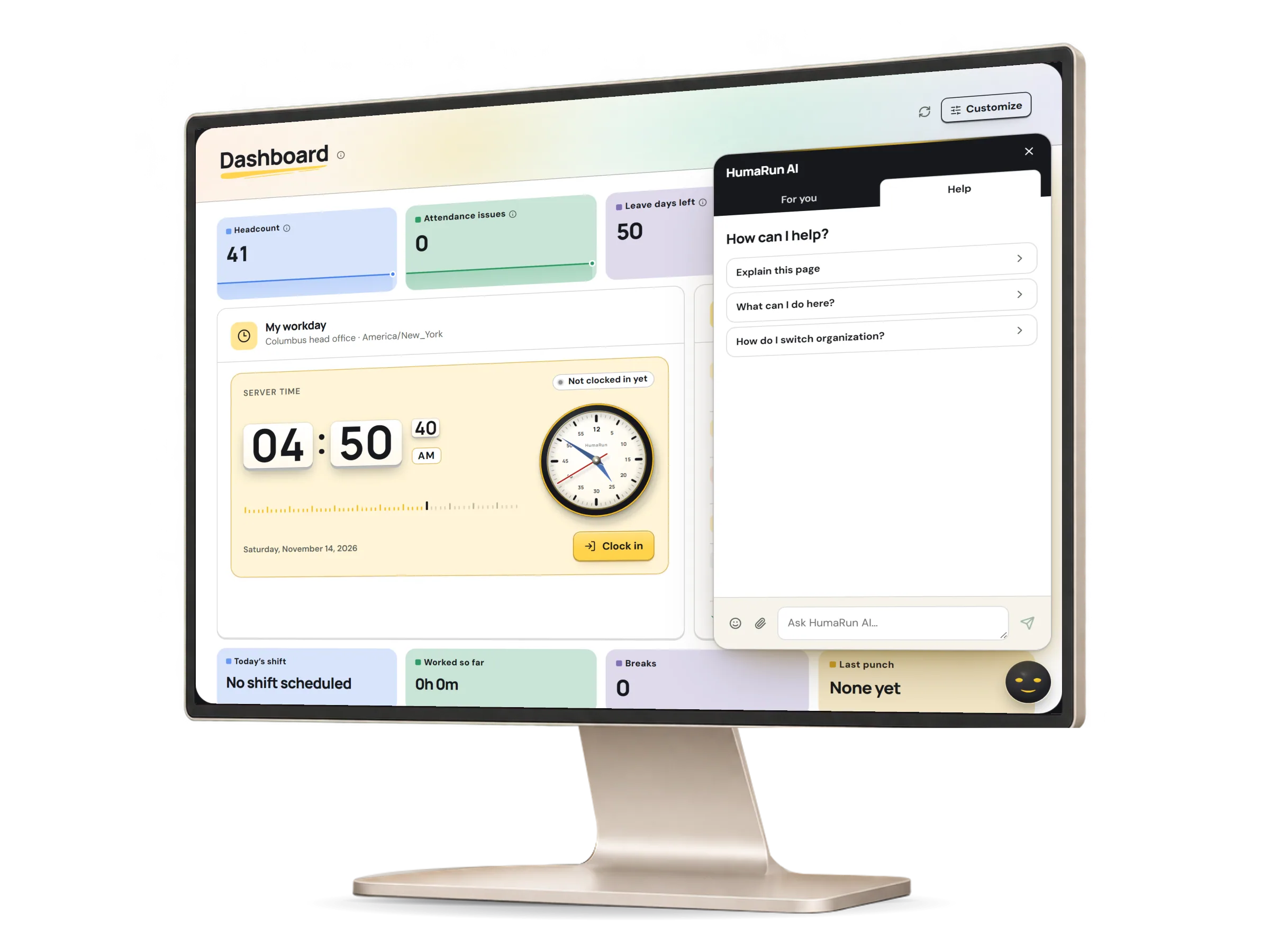
A real HumaRun screen, shown with invented sample data.

Two chats. Each with its own scope.

The website chat explains HumaRun to visitors, and the app chat helps signed-in people within their role.

In the app

Ask how to do something anywhere in HumaRun or what a message on a screen means, and get an answer from HumaRun help. Looking up your records and preparing requests are on the For you tab. It only points you to screens you can use.

On the website

Ask HumaRun, on every public page, explains what each module and feature does, the plans and prices, countries and the free trial, and can take a demo request or a message. It never sees company data.

Remembers your topics

In the app, HumaRun AI keeps your conversation and the topics you discussed until you clear them, or for as many days as your organization sets, so you can pick them up again on any device. Your access is checked each time.

A companion that reacts

The companion changes its expression and color with the tone of your message and how your request turns out. A reply carries one emoji at most, which you can switch off, and questions typed in Roman Urdu are understood, with answers in English.

Assistance never makes the decision.

Help, confirmed actions and human decisions, kept apart.

People review what matters

A prepared request stays a preview until a person confirms it, and work Autopilot only prepares waits in the Decision Inbox. Normal approvers still make the decision.

Controlled actions

HumaRun assistance only prepares what your role already allows. It records your decision on one inbox item at a time, only after you confirm it, never several at once, and never runs payroll, pay, bank, access or employment changes, which stay on their own pages. Every automated change leaves an action receipt.

Deterministic by design

HumaRun assistance is deterministic: rules, approved knowledge and your permissions. No external AI model is used, and every action waits for your confirmation.

No automated people decisions

People decide: HumaRun makes no hiring, pay, performance or employment decision. That is a boundary we keep, not a missing feature.

What this module covers.

What works today, and the controls that come with it.

Included

  • Answers about HumaRun from approved guidance, with sources and links to the right page
  • Answers from the leave, expense and working-week policies published to you, each with a citation, and “I could not find this in your policies” when nothing matches
  • By default for roles that manage company policy: quotes from the policy saved in Company setup, with its version; superseded wording is never used as an answer
  • Summaries of the records your role can open
  • A Ctrl/Cmd+K command palette to open a page, find a colleague your role may see or start a request you confirm
  • Answers from company documents shared with you, naming the document and its version; the file itself opens from the library
  • Scheduling a Company Chat meeting with the colleagues you choose, once you confirm
  • Settings per security role: whether HumaRun assistance answers, quotes company policy, summarizes records or prepares actions; turning one on never adds authority
  • Tasks given to a HumaRun domain agent, agent templates set by administrators, and handing a task to another member
  • Leave requests and withdrawals, missing time, timesheets, profile updates, expenses, shift swaps, letter requests and benefits requests, prepared for you to confirm
  • Clocking in or out, with the same checks as the My workday card
  • Raising an HR case in the category you choose, routed by that category's own rules
  • For HR and managers, within their scope: an onboarding task, an in-app reminder or a chase of a missing clock-out
  • Approvers can review requests with HumaRun assistance, then confirm
  • Autopilot at the level your organization chooses: assist only, the default; prepare work for a person; carry out low-risk routine work within set limits; or custom, choosing for each kind of work whether it is off, prepared or carried out, which can include approving (never rejecting) a routine leave request or attendance correction that passes every check
  • Company rules made from your approved policy, tested with a dry run against real records and approved by someone other than their author whenever there is a second person
  • An action receipt for every automated change, naming the rule or policy it ran under
  • Company Memory: approved preferences and notes that save people being asked twice, never override policy or permissions, and are kept only until their retention date or erased
  • Alerts to the right people before documents, licences and certificates expire, before contracts and probation periods end, and when pay details are missing before a pay cut-off
  • The Decision Inbox, where work Autopilot prepares and alerts that need a decision wait for a person
  • Suggestions on the companion's For you tab, found by fixed rules in your records, such as a missing clock-out, an approval waiting longer than your limit or a probation review not yet started; each check is off until your organization switches it on and sets its own numbers
  • Suggested drafts, such as a reminder or a welcome message, filled from approved templates and your records; nothing is sent until a person confirms it, and each kind is off until your organization switches it on
  • HumaRun AI remembers the topics a person discussed, for the session or as long as your organization chooses, so they can continue them; their access is checked again and they can clear what it remembers
  • The companion reacts in the app chat to the tone of a message and to how a request turns out
  • On the website, the Ask a question assistant answers about HumaRun's modules, features and plans, and can take a demo request or a message
  • Look-ups and requests on the For you tab: summaries of the records your role can open, and requests prepared there wait for your confirmation
  • For you in the companion: every open suggestion for your role and data scope, grouped Today, This week and Earlier, with your next setup step and the Today list
  • Most suggestions update as soon as the record behind them changes, every check also runs daily, and a suggestion closes itself once its condition no longer holds
  • In the app chat's Help tab, how-to answers for every screen your role can open and what a message on a screen means
  • Questions typed in Roman Urdu are understood, with answers in English
  • One emoji at most in a reply, from a small approved set, never on pay, legal or other sensitive topics, and switched off whenever a person asks

Controls built in

  • On a legal, tax or statutory question, the assistant names any published record on the subject and says it is not legal or tax advice
  • One decision at a time on a request in your Decision Inbox: never several at once, and never a high-risk item, which stays in the inbox
  • A preview that expires after ten minutes, runs only once you confirm it and is recorded in the audit trail as assistant-prepared
  • High-risk work, such as approving or finalizing payroll, releasing money, or changing pay, bank details or access, is always done by a person, never by Autopilot or the assistant

Try the assistant, and tell us what helps.

Tell us which everyday tasks your team repeats most.