HumaRun is loading.
Skip to content
Onboarding & offboarding

Joining and leaving, with every step owned.

Coordinate each joining and leaving with tasks for HR, the manager and the person, reminders in the app, and employment history kept on the record.

All modules
Joining trackerConcept · sampleIllustrative
  • HR29 Sep
    Welcome page, buddy and first-day contact
  • IT3 Oct
    Laptop and work sign-in ready
  • Facilities3 Oct
    Desk and building access
  • Manager6 Oct
    First-week plan and team welcome
  • New hire6 Oct
    Own details and the handbook acknowledgment
Sample figures, not a live screen

Bring people in, and see them off well.

Four parts of the journey, each with a clear owner.

  • Background import with undo

    Apply a file of up to 10,000 people in the background with progress, and undo a bad batch of new people where nothing has changed or used their records since. Anything else stays, with the reason.

  • Invitations and single sign-on

    Invite each new hire now or on a chosen day, to their work or personal email, with reminders that each send a fresh single-use link. A new hire can also activate their account through your single sign-on, or with Google at the invited address.

  • Pre-boarding with a buddy

    Before day one, a new hire sees when and where to arrive, a first-day contact, their buddy and what to bring. Until the start date they reach only what pre-boarding needs, unless you turn that off.

  • Resignation, exit and probation

    Employees resign from their own record, and HR or their line manager decides. Leavers answer an exit interview, and HR confirms, extends or ends a probation, with an optional confirmation letter.

See who is ready, and who owns the rest.

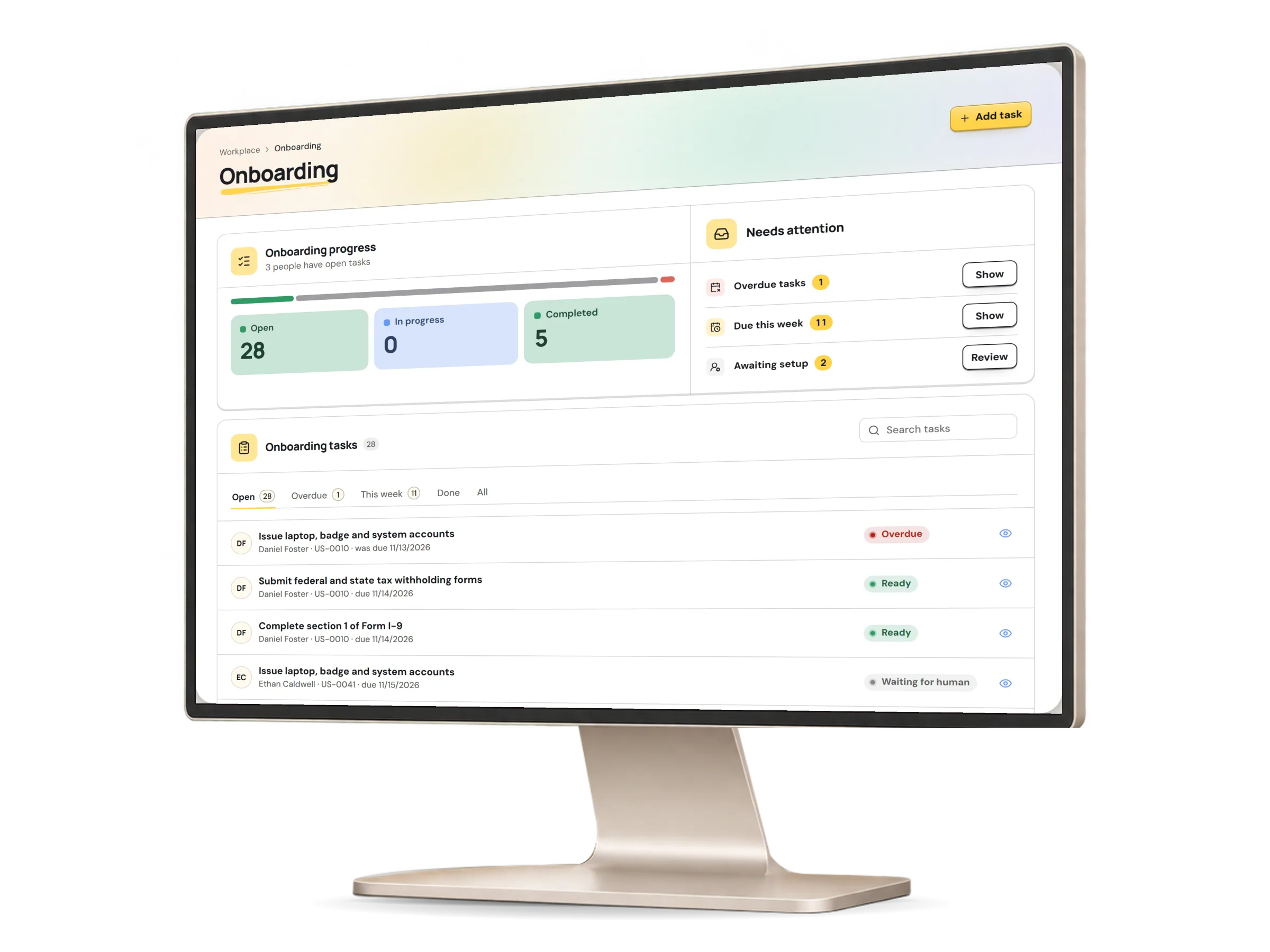
The onboarding tracker lists everyone starting in the next 60 days or still onboarding, with their invitation, details, documents and tasks, and anything that blocks day one. A task can also name its owner, such as IT, finance, facilities or one person, who is reminded and sees the task but never the person's record.

Onboarding in HumaRun: each joiner, who is ready and who owns the remaining steps, with invented sample data.
A real HumaRun screen, shown with invented sample data.

From the first file to the probation review.

Each step names who acts, from HR to the new hire.

  1. Import

    HR brings people in from a CSV or Excel file: map the columns, check every row in a preview, then confirm. Updating existing people waits for a second person's review.

  2. Invite

    HR sends each new hire a single-use link that expires. The new hire proves the email address is theirs and chooses a password.

  3. Pre-board

    HR sets the welcome page, the first-day contact and the buddy. The new hire sees them before day one, and the buddy is told.

  4. First day

    The checklist from your template is anchored to the start date and gives each task to the new hire, the manager or HR, with reminders in the app.

  5. Probation

    HR sets the probation dates and review milestones, and the review task records its outcome: passed, extended, concerns recorded or other.

From the resignation to the last sign-in.

A person decides each step, and the history stays.

  1. Resignation

    The employee resigns from their own record with a reason and a proposed last day. HR or their line manager decides, never the person who resigned.

  2. Offboarding

    HR prepares the offboarding with a last day and a reason, or a line manager recommends one where your policy allows. Nothing ends until a person approves it.

  3. Exit interview

    HR opens the interview with its questions fixed. The leaver answers once or declines, or the interviewer records the answers, and only HR reads them.

  4. Access ends

    From the day after the employment ends, the former employee sees only their own released payslips, shared documents and notification settings.

What this module covers.

What works today, and the controls that come with it.

Included

  • Onboarding and offboarding templates for legal entities, jurisdictions, worksites, jobs and worker categories, each run keeping the version it started from
  • Tasks for the new hire, the manager and HR, with due dates from your template, tasks that wait for an earlier one, and reminders in the app
  • Payroll and time preparation confirmed by HR with an evidence note, and equipment and access tasks completed from their own records, never by hand
  • Document tasks that complete only when the person acknowledges the document
  • Probation dates and review milestones, with each review's outcome recorded
  • CSV and Excel imports of up to 10,000 rows, mapped and previewed, with a second person's review before existing people are updated
  • An onboarding tracker of everyone starting soon or still onboarding, with what still blocks day one
  • New hires filling in their own missing contact details, with any change to a recorded value sent to HR for approval
  • Offboarding with a last day and a reason a person chooses, applied to the employment history on that day only once approved
  • From the day after the employment ends, access narrowed to the person's own released payslips, shared documents and notification settings, restored by a rehire
  • Accepting an invitation with a Google account, only when its verified email address is the invited one
  • A guided bulk onboarding run that imports new hires, sends each person it created an activation link, and sums up who was invited and who accepted
  • Imports applied in the background in batches of 100 rows, with progress you can follow
  • A results file for each background import, with each row's outcome and never its values
  • Undo of an imported batch, removing only the people and records the import created that nothing has changed, used or added employment history to since, and refusing the rest with the reason
  • Starting each imported person's onboarding as part of the import
  • Invitation emails with a single-use link that expires, where the new hire chooses a password
  • Invitations sent on a chosen day to the work or personal email, with reminders that each send a fresh link
  • Accepting an invitation by signing in with your organization's single sign-on, for the invited email address only
  • A pre-boarding page with arrival details, a first-day contact, a buddy and what to bring, and limited access until the start date that you can turn off
  • Requests for a new hire to upload a document of a given type to their own record by a date
  • Templates chosen by department, and named task owners such as IT, finance, facilities, payroll or one person
  • Reassigning a task with a reason, and moving a leaver's open tasks to their manager or back to HR
  • Resignations from the employee's own record, decided by HR or the line manager in the Decision Inbox
  • Exit interviews with their questions fixed when they open, and a summary of counts and averages for HR
  • Probation reviews from one of your Performance review templates, and decisions to confirm, extend or end, with an optional confirmation letter
  • Removal from every Company Chat group and channel when someone's last employment ends, however it ends, with their messages kept
  • Document tasks that complete once the document is signed inside HumaRun

Controls built in

  • Nothing ends until a person approves it, and an approved end is applied to the employment history on its date
  • A resignation is decided by HR or the line manager, never by the person who resigned
  • Ending a probation never ends the employment: that is a separate offboarding a person starts
  • Exit interview answers read only by HR
  • Named task owners see a task's title, due date and the worker's name, never the person's record