HumaRun is loading.
Skip to content
Customer relationship management

Every customer conversation, beside your people records.

Leads, contacts, companies, deals, quotes and support tickets for your customer-facing teams, in the same workspace as your people records.

All modules
PipelineConcept · sample
Illustrative
  1. Qualification10% · USD 12000.00 (weighted 1200.00)2 deals
  2. Needs analysis25% · USD 30000.00 (weighted 7500.00)3 deals
  3. Proposal50% · EUR 8000.00 (weighted 4000.00) · USD 24000.00 (weighted 12000.00)3 deals
  4. Negotiation75% · USD 16000.00 (weighted 12000.00)1 deal
Sample figures, not a live screen

From a first lead to a customer you keep.

One record for every customer, from first contact on.

Leads you can qualify

Capture leads from your own web forms or record them by hand, with where each came from, and qualify them against budget, decision maker, need and timeline. When it is ready, a lead converts into a contact, with its company and a deal if you choose.
One record per customer

An email belongs to one open lead and one active contact, and a domain to one company, so duplicates are caught as they are entered. Merge the ones that slip through, and the deals and activities you can see move with them.

A pipeline you shape

Set your own pipelines and stages, each with a probability, and move deals across the board. A lost deal needs a reason, and every change to a deal is kept.

Quotes and support tickets

Quote from your product prices in the deal's currency, as a PDF or CSV that is never an invoice, let the customer accept or decline it in their portal, and follow each ticket with a priority, an assignee and a due date.

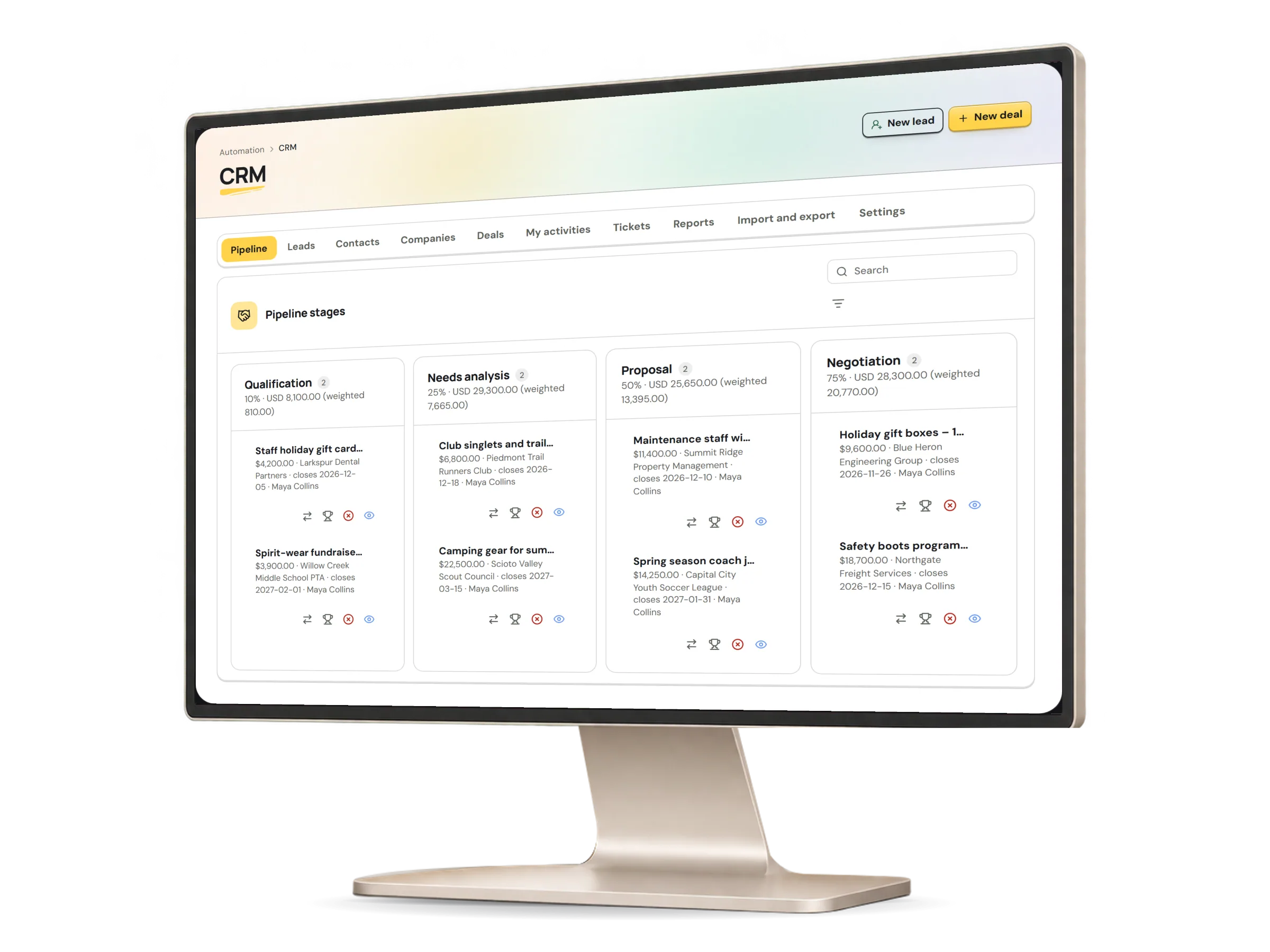
See every stage, in its own currency.

Each stage shows its open deals and their value in each currency, with a weighted value from each deal's probability or its stage's. Currencies are never added together or converted.

The CRM in HumaRun: the sales pipeline by stage, each amount in its own currency, with invented sample data.
A real HumaRun screen, shown with invented sample data.

What it does for each customer team.

For the people who sell, manage, support and reach out.

People who sell

Work the leads, contacts and deals you own or that sit in your territory, log calls, meetings and tasks, get a reminder on the day each is due, and share a booking link that offers only your free times.

Sales managers

Set up territories, pipelines and automation rules that assign owners, create tasks or update a field, reassign up to 200 records at a time, and follow pipeline value, win rate, the lead funnel, activity per person and a forecast by close month.

Account and support teams

See a customer's contacts, deals and activities on one record with its full timeline, follow their support tickets from open to closed, and give a contact a secure portal link to their company's quotes and tickets.

Marketing and outreach

Send email from your own templates. Marketing email goes only to addresses with a recorded choice and the lawful basis your organization states, a web form's consent box counts only once the person confirms it, every message carries a one-click unsubscribe, and the choice is checked again just before each email is sent.

What this module covers.

What works today, and the controls that come with it.

Included

  • Leads with a four-point qualification check, converted into a contact, a company and a deal
  • Duplicate checks by email and company domain, and merging of contacts and companies that moves only the records you can see
  • Territories: each record is seen by its owner, the members of its territory and organization-wide CRM managers
  • Pipelines and stages with probabilities, a deal board, and won or lost with a reason
  • Notes, calls, meetings and tasks on leads, contacts, companies and deals, with reminders and a calendar file for each meeting
  • An append-only timeline on every record, and saved list views, private or shared
  • CSV import of leads, contacts and companies, with a preview that writes nothing
  • Export of the records you can see as CSV or Excel, with a fresh multi-factor check for anyone who signs in that way
  • Sales reports that count only the records each role may see, and aggregate report builder datasets for organization-wide CRM managers
  • Products with a price for each currency, and quotes with exact lines and discounts
  • Customer support tickets with status, priority, an assignee, a due date and an append-only trail
  • Web forms on a HumaRun page or embedded on the website addresses you allow, which add a new lead or match an existing one by email
  • A booking link that offers only free times: double booking is blocked, and days with a holiday or closure at the host's location or the host's approved leave are closed
  • Automation rules that assign owners, create tasks, send template email or update a field when a lead arrives, a deal changes stage or a record goes quiet, with a dry run and one switch that pauses them all; no rule changes money, closes a deal or deletes anything
  • A customer portal on a secret, expiring link, where a contact sees their company's sent quotes and tickets, accepts or declines a quote by typing their name, and replies on a ticket
  • Mailbox and calendar sync: connect your Microsoft 365 or Google Workspace account, and email headers are linked to the contacts and leads you can see, while your busy times are kept off your booking link with a live free/busy check
  • A Microsoft Teams, Google Meet or Zoom link on each booking, created on the host's own account
  • Email from versioned templates, with a recorded lawful basis and a one-click unsubscribe for marketing email, and the contact's latest choice checked again just before each email is sent
  • Double opt-in for a web form's marketing box: the choice is recorded only after the person confirms it from one confirmation email
  • The CRM is included in the Complete plan

Controls built in

  • A quote is never an invoice: it adds no tax or payment terms and takes no payment
  • Amounts stay in their own currency and are never converted or added together
  • People qualify every lead; no lead is scored automatically
  • Mail that matches no contact or lead you can see is not stored

Tell us how you sell, and shape what comes next.

Tell us how your team works with customers in a demo request.